Thursday, March 20, 2008

Orbit Downloader v2.6.4 Come Out!

Orbit Downloader v2.6.4 Come Out!

In this version, we changed:
* Improve: addon for Firefox 3 Beta 4 - Thanks Nelson
* Fix: a bug may cause Orbit Downloader can not remember maximization of the main window
* Fix: a bug may cause download failure via Grab++
* Fix: a bug may cause download failure via RTSP protocol


Sunday, February 24, 2008

Orbit Downloader v2.6.3 is released!

Orbit Downloader v2.6.3 Come Out!

* Add: a menu item linked to 'Essential Freeware' in 'Help' menu
* Fix: a bug may cause 'Target category does not exist' error


Wednesday, February 20, 2008

Orbit Downloader v2.6.2 Come Out!

We released Orbit Downloader v2.6.2 just now.

* Improve: create 'Save to' directory on 'Restart download' if it does not exist
* Fix: some bugs

Friday, February 1, 2008

Free Vox music Downloader - How to download Vox music

Orbit Downloader is a free Vox music downloader which can help you to download Vox FLV music free and easily with great speed.
Also Orbit Downloader can download and manage FLV Videos/Songs from almost all of social media websites like Youtube, Myspace, Dailymotion, Metacafe, Google Video, iFilm, Yahoo, Pandora, Radioblogclub, IMEEM, iJigg, Vox...
Keywords: Free Vox music Downloader
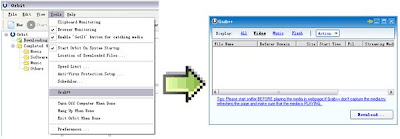
(1) Run Orbit Downloader's Grab++ first ( Orbit Downloader's Tools menu --> Grab++ )
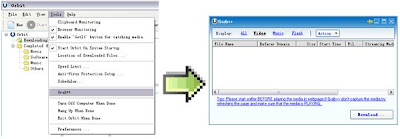

(2) Play music from Vox, then Grab++ will grab the music for you.
Make '12 All Good Things' for example. Grab++ grabs the music when it is played.
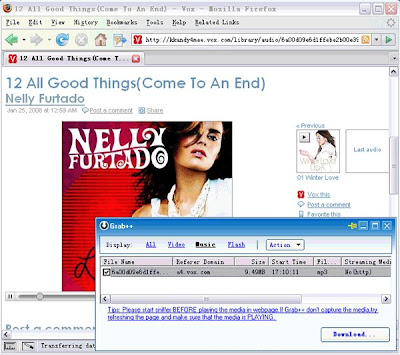

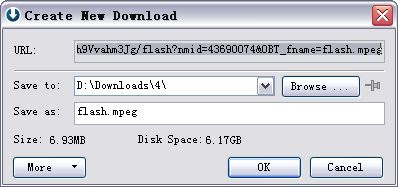
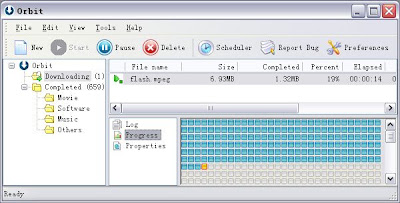
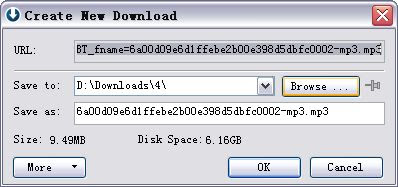
(3) Select the Vox music in the Grab++ list then click ' Download...' button, Orbit Downloader will download the selected Vox music for you.


Tips:
  • (1) You could run Grab++ to start sniffer BEFORE playing the Vox music in webpage. If Grab++ don't capture the Vox music, try refresh the page and make sure the music is PLAYING..
  • (2) The Vox videos are in FLV format. And lots of FLV players are in software download sites. Or you can download one of them athere.
  • (3) Some of the Vox videos can not be resumed because file-resume is forbidden in some video servers. If the connection is break when downloading, you could redownload it by clicking the download item's context menu 'Restart download'.


More article about "Use as Vox Downloader - How to Download Vox?" >>

Monday, January 28, 2008

Orbit Downloader v2.6.1 Come Out!

We released Orbit Downloader v2.6.1 just now.
In 2.6.1, we add index information to WMV files downloaded via MMS protocol to enable seeking when playing the WMV files. And we improve the download via RTSP protocol and fix some interface bugs.


Thursday, January 24, 2008

Use Orbit Downloader as Multiply Downloader

Use Orbit Downloader as Multiply Video Downloader - How to Download Multiply Video?
Orbit Downloader is a free Multiply video downloader which can help you to download FLV video from Multiply easily with great speed.

(1) Run Orbit Downloader's Grab++ first ( Orbit Downloader's Tools menu --> Grab++ )


(2) Play video from Multiply, then Grab++ will grab the video for you.
Make 'Women In Art' for example. Grab++ grabs the video when it is played.


(3) Select the Multiply video in the Grab++ list then click ' Download...' button, Orbit Downloader will download the selected Multiply video for you.


Relate Links - Use as Multiply Downloader - How to Download Multiply:

Monday, January 7, 2008

Orbit Downloader v2.5.2 Come Out!

Orbit Downloader v2.5.2 Come Out!

Orbit Downloader v2.5 adds new feature to make Youtube download more smoothly. And today, we release v2.5.2 to resolve 2 bugs in v2.5.1:
  • * Fix: a bug may cause Orbit Downloader can not run in Windows 2000
  • * Fix: Orbit Downloader can not remember maximization
Thank you for users reporting these bug in our forum and sending us feedback.