Monday, November 3, 2008
Which kinds of network protocols does OrbitDownloader support?
We support primary network protocols such as http、https、ftp、mms、rtsp and rtmp. You have no use for install any program especially. And we do our best to optimize it.

Saturday, November 1, 2008

Friday, October 31, 2008
My Drive Icon 1.0


Just select an icon file, select the drive, enter a drive label (optional), and apply.
you will need to refresh the view (F5) at my computer to see the result.
If you don't like the result, you can restore the default in one click.
Watch a demo on YouTubeFreeware by LeeLu Soft 2008
Download My Drive Icon Install(863kb):

Thursday, October 30, 2008
Orbit Downloader 2.7.8 is released
Orbit Downloader 2.7.8 is released.
In this version, we improved Grab Pro feature.
* Add: Orbit Downloader 2 Years commemorative edition toolbar icon
* Improve: detect file format more correctly in Grab++ and Grab Pro

In this version, we improved Grab Pro feature.
* Add: Orbit Downloader 2 Years commemorative edition toolbar icon
* Improve: detect file format more correctly in Grab++ and Grab Pro
How to show the Drop Zone?
You can go to View-Drop Zone, and check it.

There is another way to show the Drop Zone, go to the right-click menu of System Tray Icon, and check the "Drop Zone".
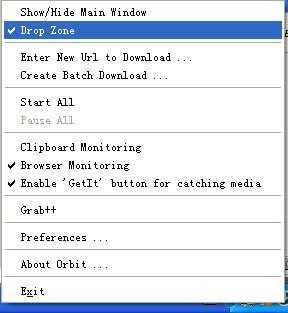
Drop Zone will be hided if make these two menuitem unchecked. Or go to the right-click menu of Drop Zone, make the "Drop Zone" unchecked. It is a little loose-tongued.


There is another way to show the Drop Zone, go to the right-click menu of System Tray Icon, and check the "Drop Zone".

Drop Zone will be hided if make these two menuitem unchecked. Or go to the right-click menu of Drop Zone, make the "Drop Zone" unchecked. It is a little loose-tongued.

Tuesday, October 28, 2008
System Context Menu in OrbitDownloader
You can use the right-click menu directly in OrbitDownloader for a completed task.
As is shown in the picture, choose the "System Context Menu", you will find the submenu is all the same as the menu you right click the file on your own computer.

Please remember, it is only works for the completed task when it is not be deleted.
As is shown in the picture, choose the "System Context Menu", you will find the submenu is all the same as the menu you right click the file on your own computer.

Please remember, it is only works for the completed task when it is not be deleted.
Sunday, October 26, 2008
How to restore a broken download file if it was deleted?
You can not restore the deleted file, if you choose "Delete real file(s) as well" when you delete a task.

If you did not delete the file when delete a task, you can go to File-Import Broken Downloads, click it and the file will be restored.


If you did not delete the file when delete a task, you can go to File-Import Broken Downloads, click it and the file will be restored.

Subscribe to:
Posts (Atom)