Showing posts with label Windows XP. Show all posts

Thursday, August 24, 2017

Windows Quick Boost 1.0

Windows Quick Boost is a free straightforward and portable (no installation) tweaking application to improve Windows responsiveness performance.
It is based on a safe collection of registry changes, the user can select which one to deploy and the application also offer a one click way to restore this tweaks back to the Windows default settings.
The interface is very simple and straightforward while providing information and status on each tweak.
The application is running as admin, this is needed for registry changes.
Supported OS: WinXP, WinVista, Win7, Win8, Win10.

Windows Quick Boost features:
-Application will ask to run as admin, it must run as admin to work.
-A portable application with no installation
-A straightforward interface
-A Collection of safe registry tweaks to improve Windows responsiveness performance.
-Ability to apply each tweak separately
-Ability to restore the default settings for this tweaks
-Providing information and status for each tweak

Important: System must restart after applying tweaks!

Freeware by LeeLu Soft

Download Windows Quick Boost portable (821kb)

Friday, November 13, 2009

Application Paths Editor 1.0


Back in the old DOS days, when you wanted to run a program from any location (folder), you would have to add the application path to the autoexec.bat file so it will be a part of the search path.
When we moved to the Windows world, running a program from the command line is not somthing you do often, but running a command from the Start->Run dialog (or Windows+R in Windows 7) is something very useful like typing mspaint or notepad.
But how can we make Windows Run dialog recognize more commands ? and how can we set the command name to launch this programs with any name we like ? and what other programs Windows recognize already ?
This is where application paths comes to help.

So what are Application Paths ?
Application Paths are registry Keys and values that are made for that issue, when you type a command on the Run dialog, Windows is searching the search path and the registry keys of Application Path to find the actual location of the program and execute it.
Important note for Windows 7 users, to launch the legacy Run dialog you have to press on Windows Key + R, Application Paths will not work from the Start->search run dialog unless the App Path command name will be the same as the original executable name.

What is Application Paths Editor ?
Application Path Editor is a protable Windows program to Add, Edit and delete Application Paths in a quick and safe way, so you can decide what are the commands Windows will recognize and what they will execute, so you can put less shortcuts on your desktop or in your Windows folder and you will know what is running with each command.

Read the readme.txt file for additional instructions

Freeware by LeeLu Soft 2009


Download Application Paths Editor portable:

Monday, October 19, 2009

XP Quick Fix Plus

Security for Online Businesses
There are a lot of excellent free Windows comprehensive repairing and fixing tools around the internet.
But there are times when you want just one quick fix for example when you are under a virus attack and you just want to enable the Task Manager or the Registry Editor so you can fight the virus back, or when some new installation changed your XP behavior and My Documents opens on every start up.
This is the right time to draw XP Quick Fix Plus with 40 common Windows XP problems fixes, only 0.58mb, portable, small and fast, a must have on every computer and with a small extra, a command line utility to fix 6 common problems directly from command line !
Be sure you are using version 2.0.1.0
Watch a demo on YouTube
Freeware by Leelu soft 2009

Download XP Quick Fix Plus Portable:

Thursday, October 15, 2009

Tray Cleaner 1.0

Click Here for Tray Cleaner version 2.0 

Tray cleaner is a small and portable tool to clean your System Tray (notification area) from past items (even if you don't see them).
The tool is very simple to use, just one click to clean, if there are no past items, Tray cleaner will inform you and the Clear button will be disabled.

Freeware by LeeLu Soft 2009


Wednesday, October 14, 2009

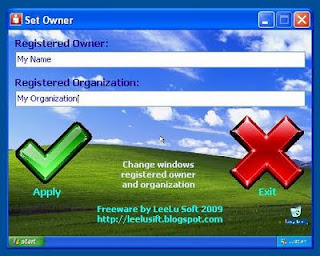
Set Owner 1.0

A mini utility that let you quickly and safely change the registered owner and organization in Windows (the information you see when you run Winver command)
Portable and simple to use, tested on Win XP, Win 7.

Freeware by LeeLu Soft 2009

Download (single file no install) 1.1mb:
http://www.mediafire.com/file/2ylojmrblm0/setowner1.zip

Saturday, July 25, 2009

My Toolbar Background 1.0


With My Toolbar Background you can create a gradient background and set it as Windows Explorer (and My Computer) toolbar background in less then the time it takes to read this sentence.

If you don't like the result, you can restore the default gray background in one click.

My Toolbar Background is a portable application for Windows XP

Freeware by LeeLu Soft


Download (single file no install + readme.txt) 481kb:

Friday, October 31, 2008

My Drive Icon 1.0


My Drive Icon, is a quick and safety way to customize the drives icons.
Just select an icon file, select the drive, enter a drive label (optional), and apply.
you will need to refresh the view (F5) at my computer to see the result.
If you don't like the result, you can restore the default in one click.
Watch a demo on YouTube

Freeware by LeeLu Soft 2008

Download My Drive Icon Install(863kb):