Windows Quick Boost is a free straightforward and portable (no installation) tweaking application to improve Windows responsiveness performance.
It is based on a safe collection of registry changes, the user can select which one to deploy and the application also offer a one click way to restore this tweaks back to the Windows default settings.
The interface is very simple and straightforward while providing information and status on each tweak.
The application is running as admin, this is needed for registry changes.
Supported OS: WinXP, WinVista, Win7, Win8, Win10.
Windows Quick Boost features:
-Application will ask to run as admin, it must run as admin to work.
-A portable application with no installation
-A straightforward interface
-A Collection of safe registry tweaks to improve Windows responsiveness performance.
-Ability to apply each tweak separately
-Ability to restore the default settings for this tweaks
-Providing information and status for each tweak
Important: System must restart after applying tweaks!
Freeware by LeeLu Soft
Download Windows Quick Boost portable (821kb)
Showing posts with label Windows. Show all posts
Thursday, August 24, 2017
Friday, December 4, 2009
Multi Path Files Finder 1.0
You can run a few searches, one for each path or you can search the all drive.
And what if you want to search for a file in a local folder and in a UNC path (network path) also?
And what if you want to search the file also in sub folders in one path but not in the other?
And what if you want to exclude a phrase from the search but not exclude it from sub folders search?
Sounds too complicated ?
Not complicated at all if you are going to use MPFF.
MPFF is a fast file searching utility that can run a file search in up to three different paths including a UNC path, and also exclude a phrase from the search, for each path you can decide to search also sub folders.
MPFF is a portable application, there is no need to install it, just unzip to any folder and execute.
MPFF was tested on Windows XP Pro (SP3) and Windows 7 Ultimat but should run on other Windows versions.
Freeware by LeeLu Soft 2009
Download Multi Path Files Finder:
Tuesday, November 24, 2009
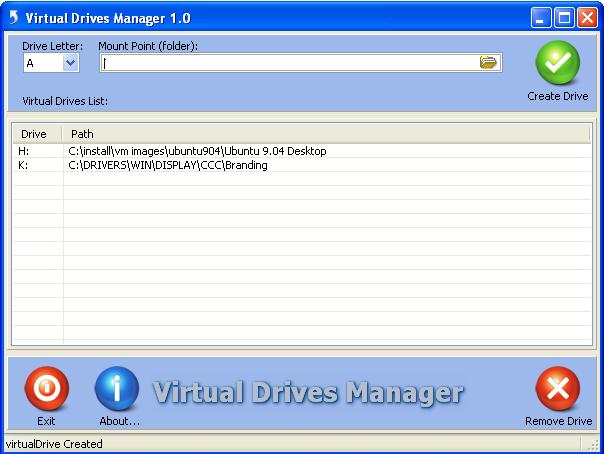
Virtual Drives Manager 1.0
There are some annoying applications that insist on being installed to a specific drive or to the root of a drive, sometimes you just want to logically divide your existing hard drive for different users, or to create a quick access to a long path directly from My Computer, or for some security reasons, etc.
Virtual Drives Manager let you in a quick way, create a Symbolic link (AKA MS-DOS Device name) to a folder and present it as drive.
Drives that are created with Virtual Drives Manager will stay even efter you will restart your system, and you can quickly remove them with Virtual Drives Manager.
Virtual Drives Manager is a portable application, There is no install process, just unzip to any folder and run it.
Like all other LeeLu Soft software it is very simple to use.
Virtual Drives Manager was tested on Windows XP Pro (SP3) and Windows 7 Ultimat but should run on other Windows versions
Freeware by LeeLu Soft 2009
Friday, November 20, 2009
Registry Live Watch 1.0
Registry Live Watch is a free, lightweight and portable tool to monitor activity on a registry key.
The tool can run minimized at the system tray (notification area) and monitor a registry key (also sub keys and vlues) for different kind of changes.
Registry Live Watch is consuming a very small amount of resources.
This program is not changing any registry settings, it is only a monitoring tool that watch the registry on a read only mode.
Registry Live Watch is a tool for pc users that knows and understand the windows registry.
Registry Live Watch was tested on Windows XP Pro and Windows 7 Ultimat but should run on other Windows versions.
Freeware By LeeLu Soft 2009
Download Registry Live portable:
Monday, November 9, 2009
Startup Discoverer 1.0
Startup Discoverer will list for you this programs and the source quickly by categories or as one list, it then can be saved as a text file or printed.
Startup Discoverer can be very useful when troubleshooting Windows.
Startup Discoverer is a portable application, There is no install process, just unzip to any folder and run it.
Like all other LeeLu Soft software it is very simple to use.
The main interface have 19 categories that you can click on to get the auto load programs for each category.
Blue category label means that there are auto programs in this category, black label means empty category.
you can click on "Show all runs" button to list all auto loads from all categories.
It is also possible to save a list as a text file and to print the a list to the default printer.
Startup Discoverer was tested on Windows XP Pro and Windows 7 Ultimat but should run on other Windows versions.
Download Startup Discoverer portable:
Tuesday, May 19, 2009
Tuesday, November 11, 2008
My Custom Folder 1.0
With My Custom Folder you can easily customize the icon for any folder you like.
Watch a demo on YouTubeFreeware by LeeLu Soft 2008
Wednesday, July 30, 2008
My Shell Folder
With "My Shell Folder" it takes only four quick steps:
- Enter a name for your folder
- Point to the target folder
- Select the folder icon
- Click create
With "My Shell Folder" you can easily delete your own shell folders.
Works on all Windows Versions.
Freeware by LeeLu Soft 2008
Download (single file, no install + 11 folder icons pack) 535kb:
Subscribe to:
Posts (Atom)