Showing posts with label windows 7. Show all posts

Thursday, August 24, 2017

Windows Quick Boost 1.0

Windows Quick Boost is a free straightforward and portable (no installation) tweaking application to improve Windows responsiveness performance.
It is based on a safe collection of registry changes, the user can select which one to deploy and the application also offer a one click way to restore this tweaks back to the Windows default settings.
The interface is very simple and straightforward while providing information and status on each tweak.
The application is running as admin, this is needed for registry changes.
Supported OS: WinXP, WinVista, Win7, Win8, Win10.

Windows Quick Boost features:
-Application will ask to run as admin, it must run as admin to work.
-A portable application with no installation
-A straightforward interface
-A Collection of safe registry tweaks to improve Windows responsiveness performance.
-Ability to apply each tweak separately
-Ability to restore the default settings for this tweaks
-Providing information and status for each tweak

Important: System must restart after applying tweaks!

Freeware by LeeLu Soft

Download Windows Quick Boost portable (821kb)

Tuesday, February 28, 2012

7 Quick Fix 2.0


Version 2.0 of the awards winning utility "7 Quick Fix" is available now.

It is the ultimate Swiss army knife for Windows 7 users and professionals.
"7 Quick Fix 2.0" a click and fix utility that can fix 108 common Windows 7 errors, problems and tweaks.
There are a lot of excellent Windows comprehensive repairing and fixing tools around the internet.
But there are times when you want just one quick fix for example when you are under a virus attack and you just want to enable the Task Manager or the Registry Editor so you can fight the virus back, or when some new installation changed your Windows 7 behavior and you want to restore it.
This is the right time to draw 7 Quick Fix with 108 common Windows 7 fixes, only 1.1MB, portable, small and fast, a must have on every computer or USB drive !

7 Quick fix is the simple and safe way to fix registry errors, system problems and fix file extension errors

 Main Features:
- 108 fixes
- Only 1.1MB
- Portable, can run from a USB drive or stick
- Each fix is applied with a single mouse click
- Auto saving the changed settings for a quick rollback
- On screen information for every fix
- Fixes are divided into 6 categories (Enable / Disable, Restore missing stuff, Performance, Errors and Crashes, Tweaks, Files Association)
- No scanning or other resource consuming process, just execute and click.

A must have on every Windows 7 based computer, when the time comes, you will not regret this 1.1MB on your drive!
If you are looking for the Windows XP version, click here to jump to XP Quick Fix Plus Post
Freeware by LeeLu Soft 2012

New! How does it works ? click to read developer description on how 7 Quick Fix works (new window)

Download a portable version of 7 Quick fix from our new site, CLICK HERE

Download "7 Quick Fix 2.0" Portable:
Download "7 Quick Fix 2.0" portable:


Download from FileHungry:
Download from NONAGS:

Download from Sfotware Informer:
Software.Informer Editor's pick award
"7 Quick Fix" Anti Virus reports as clean software by:
SOFTPEDIA:
SOFT82:
Softoxi:
FreewareFiles:
NONAGS (tested with 3 AV and 2 Anti-Malware):

Friday, October 7, 2011

Start 4 Seven 1.0

A Lot of Windows 7 users are looking for a way to restore the classic Windows XP start menu on a Windows 7 machine.
There are some tweaking tools that can replace the Windows 7 start menu or you can tweak the registry and use the Windows 7 favorites as a start menu, etc.

How about a different approach to this issue ?

Imagine a small executable (369kb only), portable (no installation, can be executed from a USB stick), without any system modification, no tweaks, no changes to the existing Windows 7 (or 8) start menu, and completely free to use.

All you get is what you wanted..., the old good green classic start button with the classic start menu, you can pin the button into one of 5 different desktop positions (right click on the button), now left click the button and here we go with your classic start menu.

Start 4 Seven is a portable application without any installation and without any system modifications or tweaking.

Although Start 4 Seven was developed for Windows 7, many users reported that it works fine on Windows 8 also, this was never tested by LeeLu Soft, but many users insists they tested it and it works just fine.

Please read the included Readme.txt file for additional important information.

New! How does it works ? click to read developer description on how Start 4 Seven works (new window)


Freeware by LeeLu Soft 2011

Download (single file, no install) 352kb:
Download From SoftWorld:
Download from FileHungry:

Sunday, June 20, 2010

7GMode

7GMode is a small, one click portable tool to enable or disable the Windows 7 God Mode.

In Windows 7 sometimes when you try to find a configuration applet, you find yourself browsing between a lot of windows and applets while trying to remember where you change things from.
Windows 7 God Mode is a special folder that contains all the configuration applets divided by a logical way in categories, so it is very easy to find and launch what you are looking for.

Yes, I know you can make this folder by yourself, but this is the easy and safe way.
you can also choose to create (and remove) a shortcut to God Mode from your desktop.
If you didn't create a shortcut, just open the root of drive C:\ and you will see the God Mode Folder, open it and have fun.

Freeware by LeeLu Soft 2010.

Download (single file no install) 186kb:

Friday, March 26, 2010

Windows 7 Little Tweaker - Version 1.2 Update

Windows 7 Little Tweaker is a small and simple to use utility that let you easily activate a few useful extras for Microsoft Windows 7 32bit platforms.
Windows 7 Little Tweaker is a portable application, you need no install process, just extract the file from the zip archive, right click on the w7lt12.exe file and run as administrator.
This version of the awards winning utility supports now all the versions of Windows 7 32bit, do not use this tool with Windows XP or other Windows platforms.
More information can be found in the included readme.txt file.
Freeware by LeeLu Soft
Download portable version of 7 Little Tweaker from our new site, CLICK HERE
Download Little Tweaker Install (870kb):


Monday, December 21, 2009

7 Quick Fix 1.0

Check our new Site, faster, clean design, easy to browse, direct download links and more
This is version 1.0 of "7 Quick Fix", version 2.0 is available here
There are a lot of excellent Windows comprehensive repairing and fixing tools around the internet.
But there are times when you want just one quick fix for example when you are under a virus attack and you just want to enable the Task Manager or the Registry Editor so you can fight the virus back, or when some new installation changed your Windows 7 behavior and you want to restore it.
This is the right time to draw 7 Quick Fix with 21 common Windows 7 fixes, only 472kb, portable with no install just click and run, small and fast, a must have on every computer !
If the day will come and you will need it, you will not regret for this 472kb on your drive or USB drive.
7 Quick fix, like its successful predecessor "XP Quick Fix Plus" is a simple, fast and efficient click and fix tool.
"7 quick fix: a Swiss Army Knife at Symantec Blog
Watch a demo on YouTube
Freeware by LeeLu Soft 2009

Download "7 Quick Fix v1.0" portable:


Friday, November 13, 2009

Application Paths Editor 1.0


Back in the old DOS days, when you wanted to run a program from any location (folder), you would have to add the application path to the autoexec.bat file so it will be a part of the search path.
When we moved to the Windows world, running a program from the command line is not somthing you do often, but running a command from the Start->Run dialog (or Windows+R in Windows 7) is something very useful like typing mspaint or notepad.
But how can we make Windows Run dialog recognize more commands ? and how can we set the command name to launch this programs with any name we like ? and what other programs Windows recognize already ?
This is where application paths comes to help.

So what are Application Paths ?
Application Paths are registry Keys and values that are made for that issue, when you type a command on the Run dialog, Windows is searching the search path and the registry keys of Application Path to find the actual location of the program and execute it.
Important note for Windows 7 users, to launch the legacy Run dialog you have to press on Windows Key + R, Application Paths will not work from the Start->search run dialog unless the App Path command name will be the same as the original executable name.

What is Application Paths Editor ?
Application Path Editor is a protable Windows program to Add, Edit and delete Application Paths in a quick and safe way, so you can decide what are the commands Windows will recognize and what they will execute, so you can put less shortcuts on your desktop or in your Windows folder and you will know what is running with each command.

Read the readme.txt file for additional instructions

Freeware by LeeLu Soft 2009


Download Application Paths Editor portable:

Thursday, October 15, 2009

Tray Cleaner 1.0

Click Here for Tray Cleaner version 2.0 

Tray cleaner is a small and portable tool to clean your System Tray (notification area) from past items (even if you don't see them).
The tool is very simple to use, just one click to clean, if there are no past items, Tray cleaner will inform you and the Clear button will be disabled.

Freeware by LeeLu Soft 2009


Wednesday, October 14, 2009

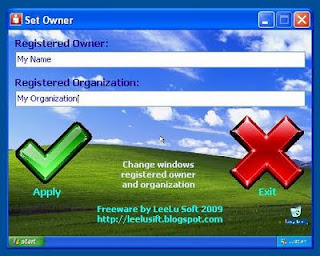
Set Owner 1.0

A mini utility that let you quickly and safely change the registered owner and organization in Windows (the information you see when you run Winver command)
Portable and simple to use, tested on Win XP, Win 7.

Freeware by LeeLu Soft 2009

Download (single file no install) 1.1mb:
http://www.mediafire.com/file/2ylojmrblm0/setowner1.zip